OspreyFlowOpen-source project

Features · release v0.6.0

Everything in OspreyFlow today

Everything on this page is built and in release v0.6.0. Screens are from demonstration deployments with synthetic data, and are being replaced.
Get started

The Glass: analysis

  • Search. Names found with typos, variants and sounds-like matches, full text with the passage highlighted, and suggestions as you type, with your access inside every query.
  • Network. Radial, organic and clustered layouts; communities; ranking by betweenness and other measures; expand from any node.
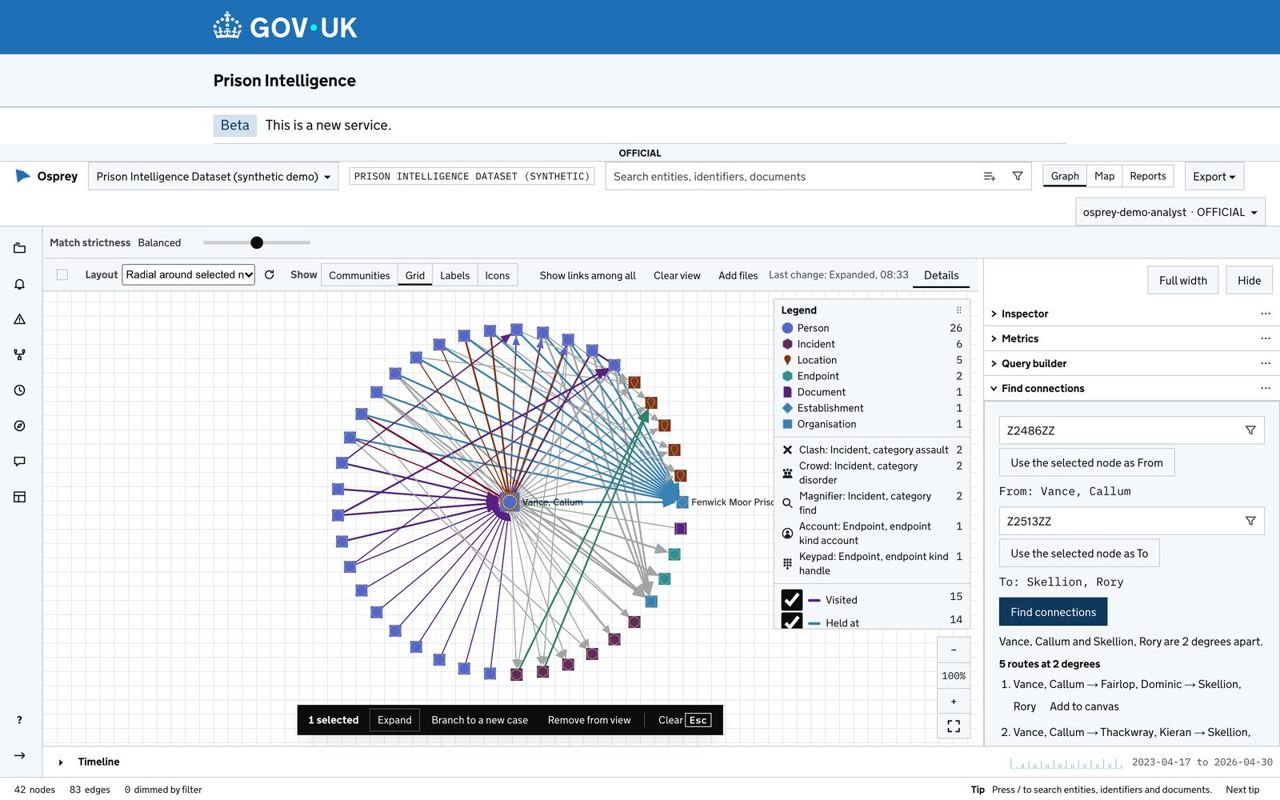
  • Find connections. The shortest routes between two people, each step backed by its records.
  • Connection strength. How strongly a link is drawn rests on its count and its recency. How rare a shared value is is shown beside it, explained in the Inspector and usable in a rule.
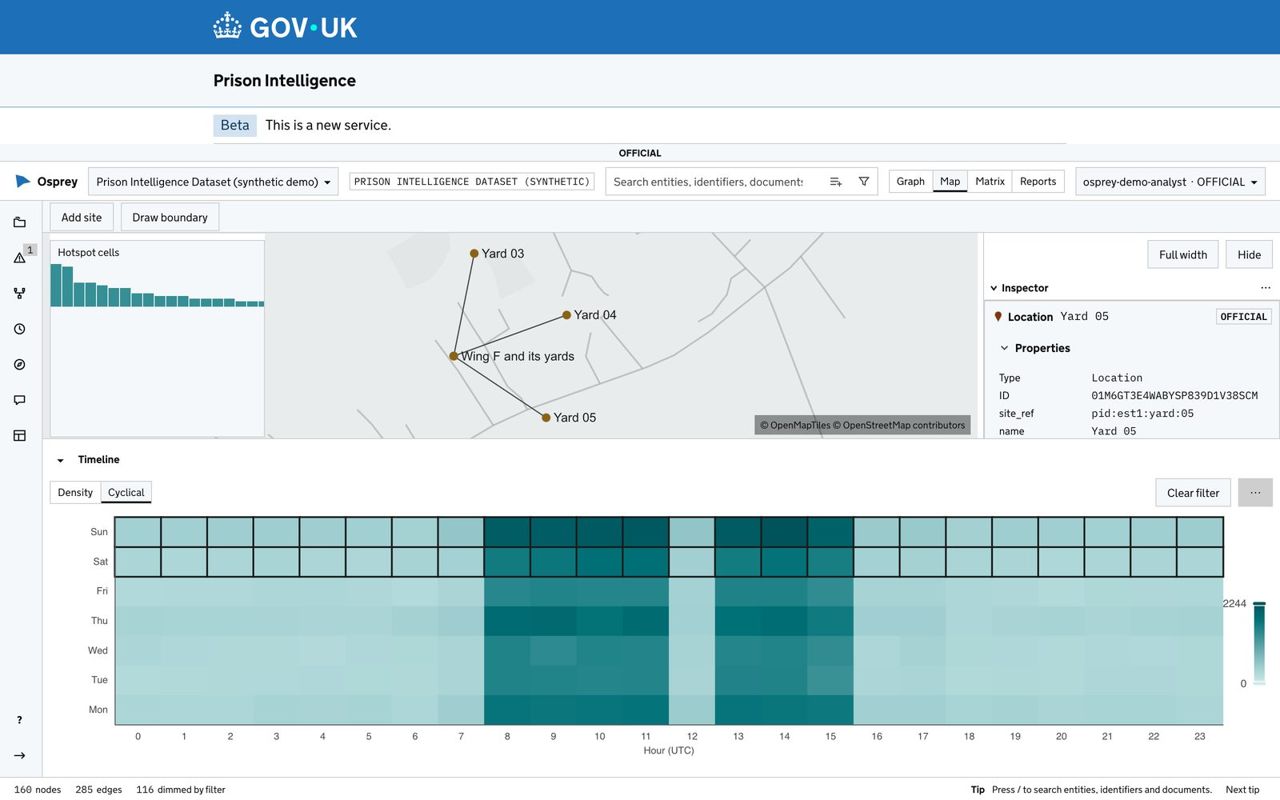
  • Map. Events on a site plan or a street map; draw a boundary and filter to what falls inside it.
  • Timeline. Select a period and every view dims what falls outside it; a heat map shows the hours and weekdays.
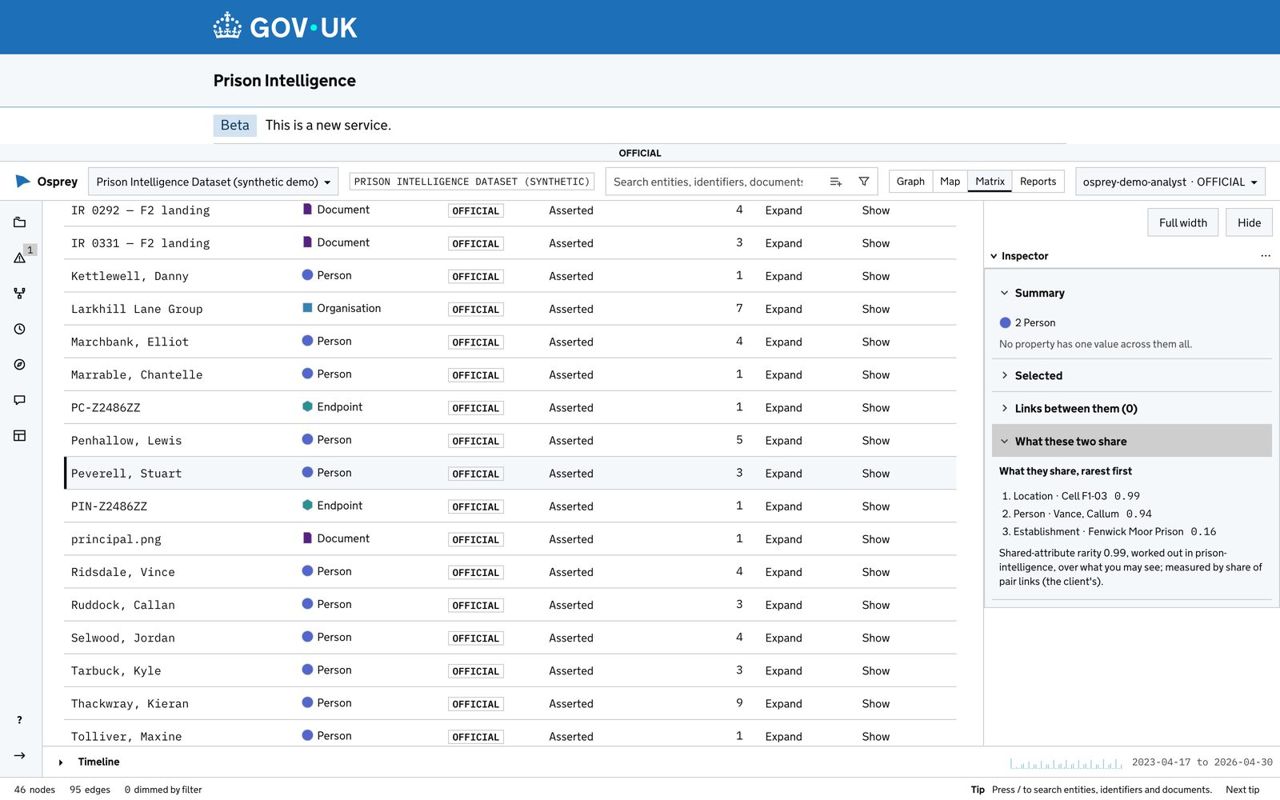
  • Matrix. The network as accessible tables, with each link's strength and how rare what its two ends share is.
  • Reports. Trends, report packs with marked notes, publishing to viewers and export.
  • History. Every step in a view is kept and can be restored.
Find connections: the routes between two people, listed beside the network
Find connections: the routes between two people, listed beside the network. Demonstration deployment, synthetic data; every name shown is invented.
Events on a map of a site, with a heat map of the hours and weekdays they happen
Events on a map of a site, with a heat map of the hours and weekdays they happen. Demonstration deployment, synthetic data; every name shown is invented.
The Matrix view: the network as accessible tables, with what two people share
The Matrix view: the network as accessible tables, with what two people share. Demonstration deployment, synthetic data; every name shown is invented.

Ingest Studio: bringing data in

The gate into the network. Loaded data reaches a dataset only through a pipeline someone published.
  • 1 Model. A domain model for each dataset: its entity types, link types and markings. Starters for crime, anti-money laundering, fraud and cyber.
  • 2 Sources. Files, a SQL database, an HTTP API or JSON files, and on the shared-platform profile S3 buckets and Athena, each with a declared marking and legal basis.
  • 3 Pipelines. Each source with its own profile, mapping and load, published as a version.
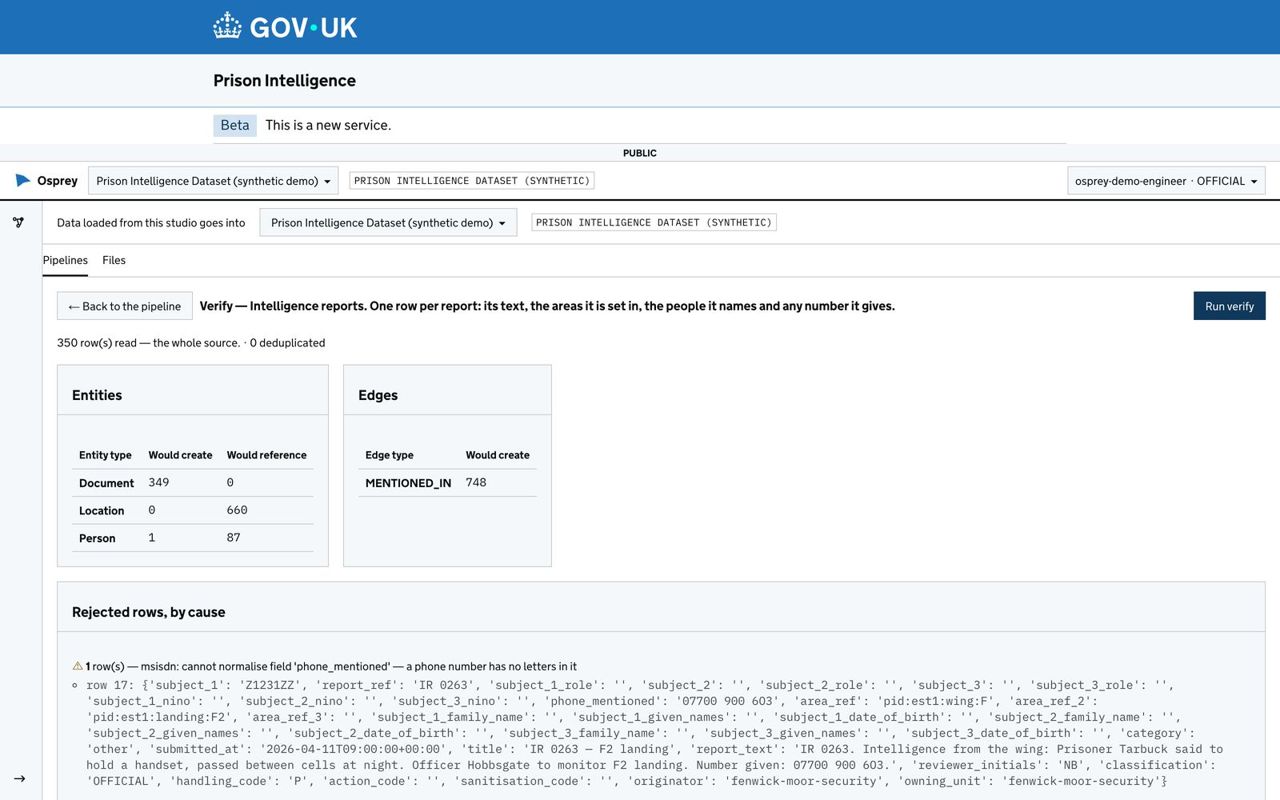
  • 4 Runs. By hand, on a schedule or when a file arrives. Verify shows what a file would create and which rows it would reject before anything loads.
  • Held rows. A rule can hold rows for a reviewer before a load commits.
  • Revert. A load can be taken back; its links and events are withdrawn and the record of it kept.
  • Entity resolution. Matching across sources with a strictness an analyst can see and change.
Verify in the Ingest Studio: what a file would create, and the rows it would reject, before it loads
Verify in the Ingest Studio: what a file would create, and the rows it would reject, before it loads. Demonstration deployment, synthetic data; every name shown is invented.

Rules and Monitoring

  • One queue for every alert you may see, by severity and age.
  • Rules as sentences, built from your own types and links, previewed on the last 90 days.
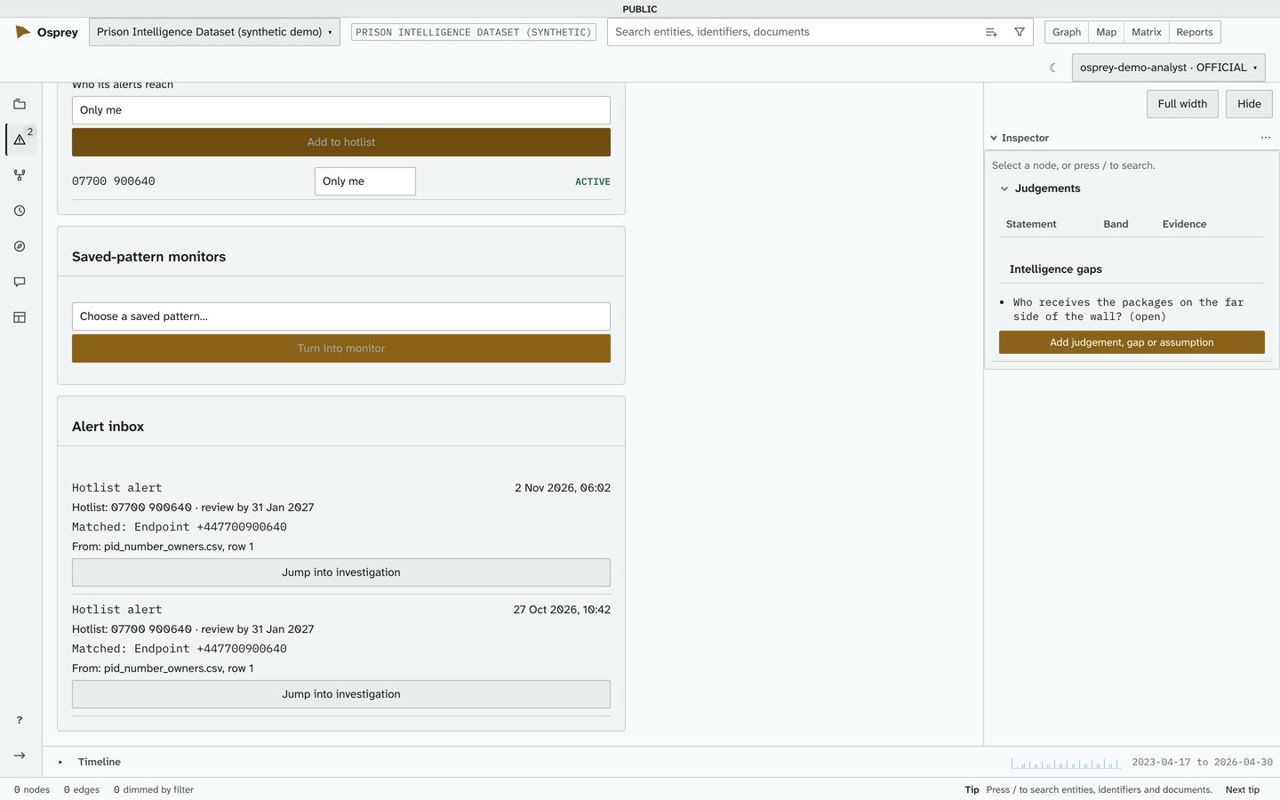
  • Hotlists and watches on a phone number, an email address or an account, each with a review date.
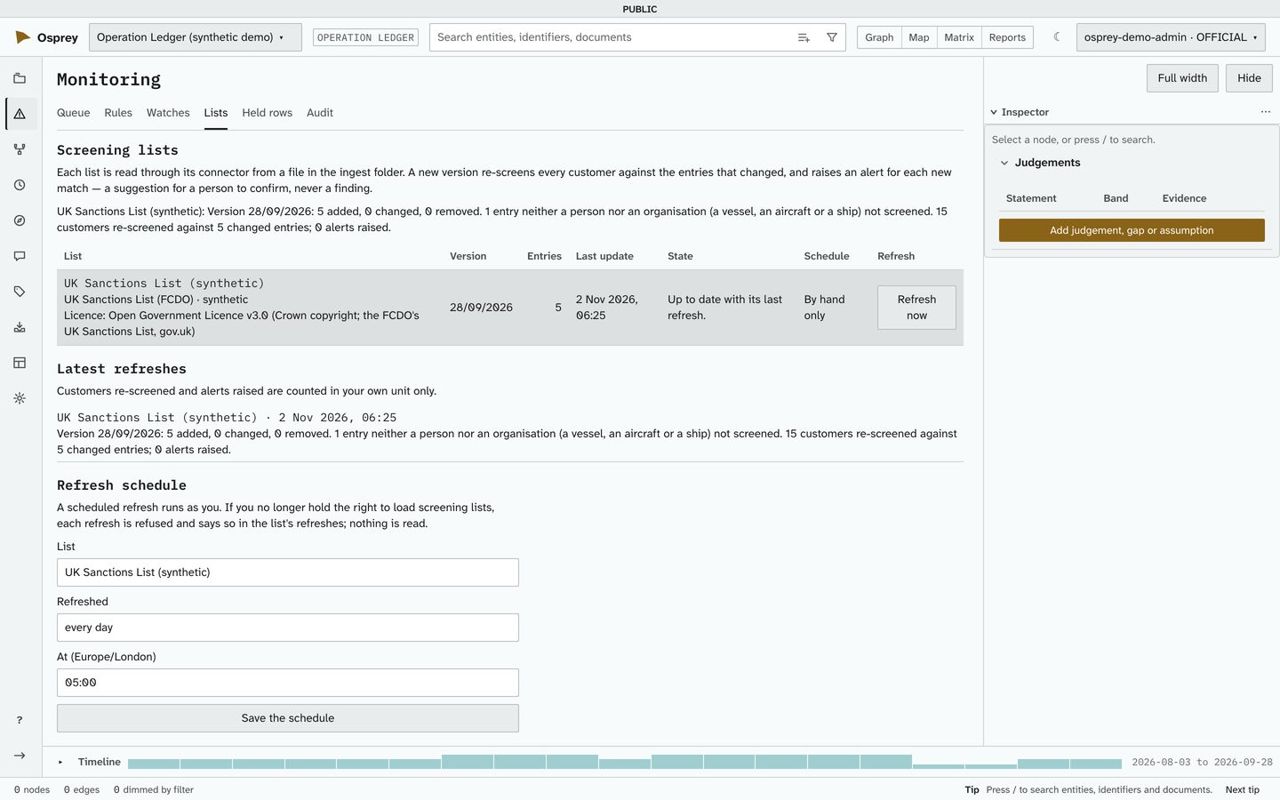
  • Screening lists. Connectors for the UK Sanctions List, OFAC, the EU and UN consolidated lists and OpenSanctions, re-screened when a list you load changes. The UN and OpenSanctions lists stay synthetic until their licences are confirmed.
  • Templates for structuring, rapid movement, circular flow, high-risk jurisdictions, large cash and dormant accounts.
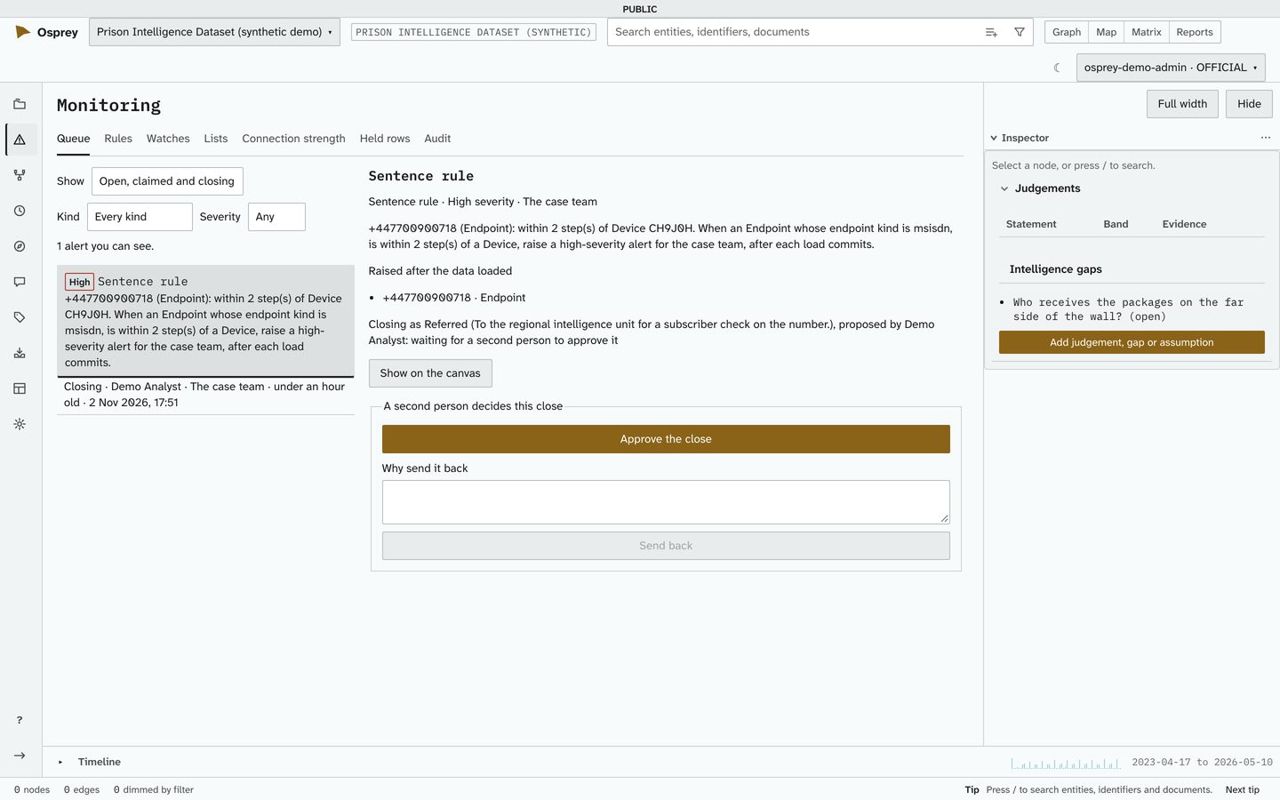
  • Closing reasons, and a second person for a high-severity close.
  • From an alert to a report pack, and to a monitoring dashboard.
An alert whose closing waits for a second person to approve it
An alert whose closing waits for a second person to approve it. Demonstration deployment, synthetic data; every name shown is invented.
A screening list with its version, licence and latest refresh
A screening list with its version, licence and latest refresh. Demonstration deployment, synthetic data; every name shown is invented.
A hotlist and the alerts it raised, each saying what it matched
A hotlist and the alerts it raised, each saying what it matched. Demonstration deployment, synthetic data; every name shown is invented.

Drawing boards

The analysis canvas shows what the data says. A drawing board is where an analyst writes down what they know that the data does not yet say.
  • Declare a person, an account or a place and draw the links between them, by pointer or by keyboard.
  • Each case has its own analyst layer; the source data stays clean and no other case sees a drawn item.
  • Every drawn item records who drew it, its marking, a grading (5x5x5 by default) and its source: a note, a document, or both.
  • Promotion into a dataset happens as a load, reviewed by a second person where the dataset asks for it.
  • A drawn item that resembles a loaded one is offered as a pair; the analyst decides, and nothing is merged.
  • An analyst can propose a new link type; a data engineer decides whether it joins the domain model.
  • A withdrawn item is kept in the record, never erased.

Models and questions

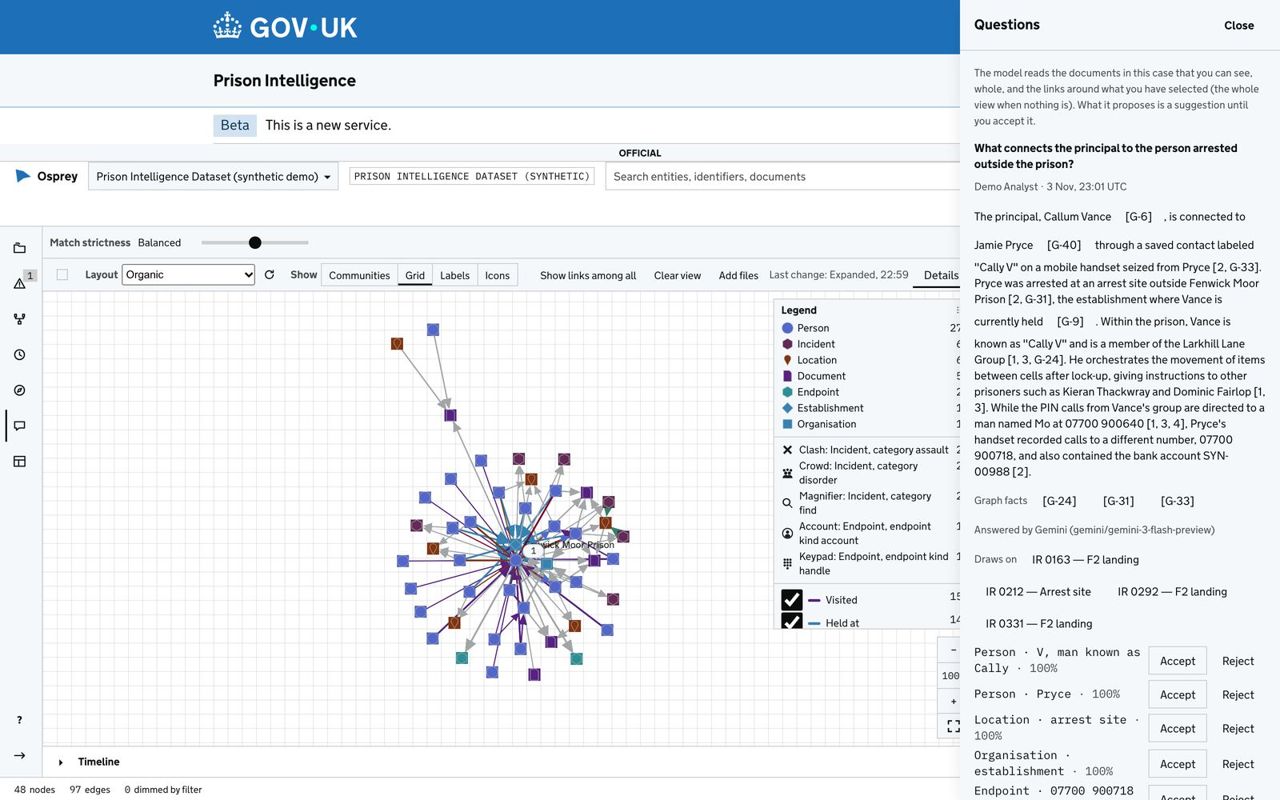
  • Ask & Chat. Ask about the documents and the graph around your selection. Each cited fact is a button that selects it on the canvas.
  • Extraction. Names, numbers and places found in documents arrive as inferred, to accept or reject. On the shared-platform profile, a second, open-source extraction engine for structured facts in documents is installed and runs; no screen uses it yet.
  • Local by default. Extraction, vision, transcription and embeddings run on the deployment itself.
  • Hosted engines, by permission. Each dataset has an egress setting, and material leaves only when that and its handling code both allow it. On the shared-platform profile, your organisation's own AI gateway, or Amazon Bedrock in London, checked so far against a stand-in gateway, not yet against AWS or an organisation's own.
  • Every answer names the engine and model that produced it.
  • Keys are write-only, held by the model gateway alone, with limits and usage per engine.
Ask & Chat: an answer that cites documents and graph facts, with the engine that produced it
Ask & Chat: an answer that cites documents and graph facts, with the engine that produced it. Demonstration deployment, synthetic data; every name shown is invented.

Admin and access

People, roles and teams

Built-in roles (Analyst, Data Engineer, Administrator, Reports Viewer, Rule author) and roles you define. No one can give more than they hold.

Sign-in

OspreyFlow's own accounts. On a server of your own, your organisation's account through Microsoft Entra ID, ADFS or another OpenID Connect provider.

Markings and clearance

Handling markings on every record, a highest allowed marking per dataset, and reads filtered in the store.

Audit

Who did what and when, including every export, every approval and every change to what may leave the deployment.

Dashboards

Apache Superset embedded in a case with the same sign-in, reading a reporting feed.

Backups and updates

Signed releases. On one computer or a server of your own, installed from a release, an update is backed up first and rolled back on failure; Enterprise is updated by installing the new release.

A shared government platform

A profile for shared government Kubernetes platforms: one namespace, the platform's managed services, non-root containers and a single-copy shape for a proof of concept, with sign-in through Microsoft Entra ID. Installed and checked on a test cluster, not yet on a platform. There, scheduled runs act as their owner while the owner has signed in within the last 24 hours, and reporting runs through Apache Superset; the administration guide's section 6a has every limit.

Architecture

Three tiers, separated by four typed ports, so an engine can be swapped without touching what sits above it.

The Glass

React and TypeScript. Sigma.js and Graphology for the network, MapLibre GL with PMTiles for maps, Apache ECharts for charts, GOV.UK Frontend for the GOV.UK theme.

The Conduit

Python and FastAPI. The API, access control, entity resolution, extraction and model routing. Stateless.

The Vault

ArcadeDB for the graph, DuckDB or ClickHouse for analytics, OpenSearch for search, PostgreSQL for cases, roles and audit, Valkey, S3-compatible object storage or Azure Blob, LiteLLM as the model gateway.

The four ports are the graph, analytics, compute and models. An adapter is supported once it passes the same conformance suite as every other adapter behind that port.

Want help to run it? Solirius Reply offers pilots, builds and support: ospreyflow.net.